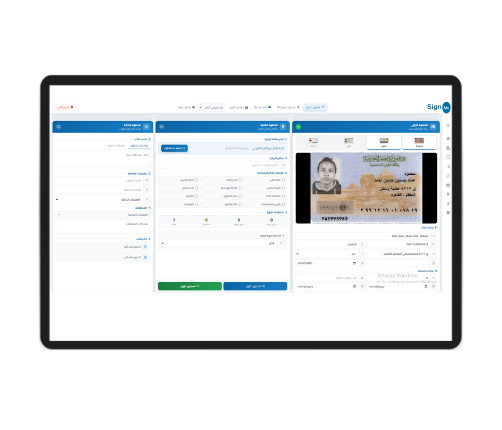
Egyptian National ID OCRDesktop App for Enterprise
Reads NIDs, passports, and driver licenses in 3 seconds, and auto-fills any Windows app. Direct export to Excel, MSSQL, and XML.
Desktop OCR
Extract ID data in 3 seconds at 99.9% accuracy — ID scanner or webcam.
Auto-fill Any App
Smart keyboard types data into any Windows app — Excel, CRM, or Core Banking.
Batch Processing & Export
10 IDs per scan. Batch export to Excel, MSSQL, XML, or any database.
Why thousands of office staff use SignMe ID & Passport Reader every day
SignMe ID & Passport READER is designed for data-entry staff, KYC officers, reception, and HR — replacing manual typing with a smart scan.
Professional Desktop OCR
Place the card on the ID scanner or any supported scanner; the app extracts every field in seconds.
- Egyptian NID (new and old)
- Passport MRZ + visual zone
- Driver + vehicle licenses
- Photo + face crop capture
Auto-fill in Any App
Extracted data is typed automatically into any app — a banking system, or even your internal core-banking app. No copy/paste.
- Smart virtual keyboard
- Pick fields per form
- Customizable typing order
- Zero entry errors = zero penalties
Batch Processing + Export
Place 10 IDs at once on the scanner; the app extracts data from each card and exports it to Excel, MSSQL, XML, or any database.
- Up to 10 IDs per pass
- Export to Excel, CSV, XML
- Direct DB link: MSSQL, Oracle, MySQL
- Per-form export templates
From the card to your app in seconds
Place the card on the scanner
ID scanner, any TWAIN / WIA scanner, or even a webcam — all supported.
One click to start scan
Keyboard shortcut or in-app button — capture in under a second.
Smart OCR extracts data
In 3 seconds, 14 NID fields appear with per-field confidence.
Pick your target app
Open Excel, CRM, or any Windows form. The virtual keyboard types data into the right fields.
Save + export + audit log
Card image, extracted data, and operator are stored in an auditable log.
Professional, clear, and fast
Everything on one screen — card preview, extracted fields, confidence scores, and export buttons. Staff work with the fewest possible clicks.
For every department that handles identity
Works with every device and back-office stack
Try the app on your team's PCs
Book a 30-minute demo. We'll show the app on your screen, install it on a sample machine, and demonstrate the integration with your system.